
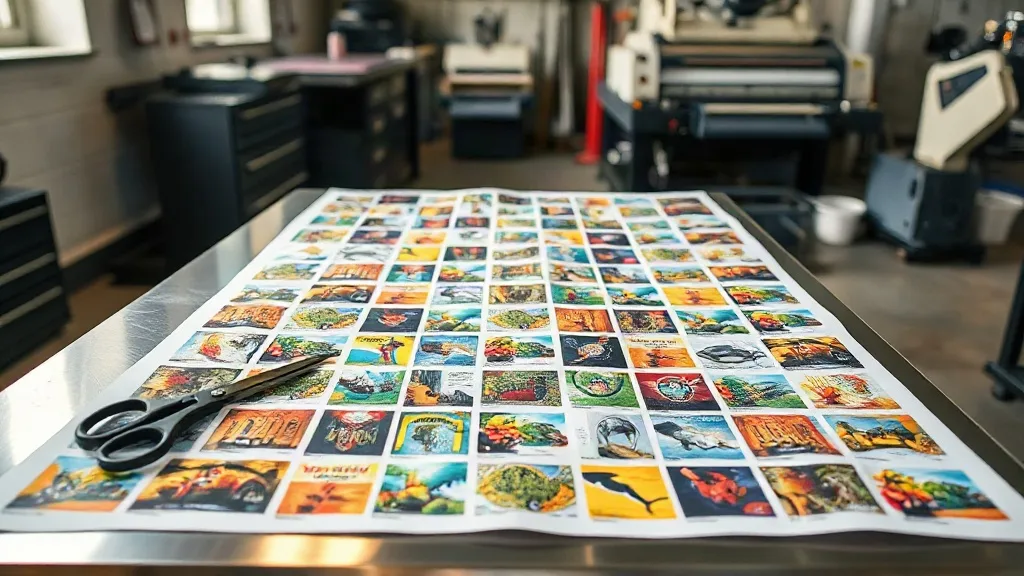
Most print shops lose money on transfer film long before the heat press ever closes. It happens in the layout: a few centimeters of unused margin here, a duplicated design there, a reprint because a file was trimmed too tight. A DTF Gangsheet exists to solve exactly that problem. Instead of sending one design at a time to the printer, you arrange multiple graphics on a single continuous sheet, print once, and cut them apart afterward. The savings are not theoretical. They show up in film cost, powder consumption, ink, and the hours your staff spends loading and unloading rolls.
This guide focuses on the operational side of gangsheets: how to lay them out so they press cleanly, which mistakes quietly inflate your cost per unit, and how to decide when a gangsheet makes sense versus a single-image print.
What a Gangsheet Actually Changes in Your Workflow
A single-image print run means one file, one pass through the printer, one powder shake, one cure. Do that ten times for ten small designs and you have paid the fixed cost of setup ten times over. A gangsheet consolidates those ten passes into one. The film roll advances once, the powder station runs once, and the curing tunnel handles the whole sheet in a single trip.
That consolidation is where the economics come from. DTF film is sold by the meter or by the roll, and the printer consumes it whether or not the surface is covered. Empty space on a sheet is money spent on nothing. Filling that space with sellable designs is the entire premise.
There is a second, less obvious benefit: consistency. When a batch of shirt orders goes onto one sheet, every transfer in that batch comes off the same printer pass with the same ink density and the same powder coat. Color drift between units in the same order drops noticeably, which matters for team jerseys, event merch, and anything a customer will photograph side by side.
Where the Cost Per Print Actually Sits
Break a transfer down into its components and the picture gets clearer:
- Film: priced per running meter, so unused vertical space is pure loss.
- Ink: white underbase dominates consumption, and it scales with printed area, not with design count.
- Powder: applied across the wet ink, so gaps between designs waste adhesive.
- Labor: loading, powdering, curing, and trimming all cost time per sheet, not per design.
Labor is the component most shops underestimate. Trimming ten designs off one sheet takes roughly the same handling time as trimming two, because the setup and cleanup dominate. Ten separate prints multiply that overhead.
Layout Rules That Keep Gangsheets Pressable
A dense sheet is not automatically a good sheet. Cram designs too close and you create trimming problems, powder bridging, and transfers that are impossible to align on a shirt. These spacing rules come from repeated trial on production floors and they hold up well.
Leave Real Space Between Designs
A common working minimum is 3 to 5 mm of clear space between neighboring graphics. Below that, the white underbase can bleed across the gap during curing, and your trim line becomes ambiguous. If a design has a soft edge, a gradient, or a distressed texture that fades out, push the gap wider, closer to 8 mm, because the fade needs room to terminate visually.
Also keep a margin from the sheet edge. Film edges can curl slightly during curing, and designs printed flush to the border tend to lift or distort at that edge.
Group by Color and by Substrate
If your printer setup allows it, cluster designs that share heavy white coverage. It makes the ink load more even across the sheet and reduces the chance of one area curing differently from another. On the cutting side, group designs destined for the same garment color, so your press operator can pull one stack and work through it without sorting.
Respect the Real Print Width
Printer specifications list a maximum width, but the usable width is usually a few millimeters narrower once you account for edge clamping and the trim margin. Build your template at the usable width, not the advertised one. Discovering the difference after a full roll of wasted film is an expensive way to learn it.
Nest, Do Not Just Tile
Rectangular tiling leaves gaps around irregular shapes. If your rip software supports nesting, use it, particularly with designs that have cutout silhouettes or asymmetrical outlines. Rotating a long, narrow design 90 degrees often reclaims a strip of film that would otherwise go unused. A 10 percent gain in sheet utilization on a busy production week is not a rounding error.
Building the File: A Repeatable Checklist
The layout decisions happen in your design tool, and small file errors there cause most reprints. Run through this before sending anything to the printer:
- Set the canvas to your usable print width and a length that matches your film stock increment.
- Place designs at 100 percent scale. Scaling after placement is how designs end up a few millimeters off from the size the customer approved.
- Check the white underbase layer. Every design needs its own underbase, and chokes or spreads on small text need to be adequate or the white will peek around the edges.
- Add registration marks or trim guides if your cutter uses them. They cost almost no space and save considerable trimming time.
- Flatten transparency before export. Live transparency can render unpredictably in the rip.
- Export at 300 DPI at final size and confirm the file dimensions match the canvas, not the original design bounding box.
That last point catches more people than any other. A design exported at its own bounding box, then placed on a gangsheet canvas, can shift position or scale unexpectedly depending on the export settings.
Press Settings That Suit Multi-Design Sheets
Pressing a gangsheet-cut transfer is the same operation as pressing a single transfer, with one difference: the pieces are smaller and often closer to the edge of the garment, so alignment matters more.
Standard DTF parameters apply. Most films press around 150 to 160 degrees Celsius for 10 to 15 seconds at medium pressure, then the carrier sheet peels cool. Cool peel is the safer default for fine detail and small text. Warm peel can work with some film and powder combinations, but it demands a consistent hand and a consistent temperature, and inconsistency is exactly what ruins a batch.
For small transfers, a pressing pillow or a dedicated small-platen press helps distribute pressure evenly across the piece. Large platens can rock slightly on small pieces, producing a partial bond that looks fine until the first wash.
Trimming Without Losing Detail
Trim close, but not into the design. A 1 to 2 mm border around the printed area is enough for most graphics and keeps the transfer from feeling stiff on the garment. For designs with a white outline or a deliberate border, follow the design rather than adding an arbitrary margin.
Keep a pair of sharp detail scissors and a rotary trimmer at the station. Dull blades drag on the film and can delaminate the powder layer at the cut edge.
When a Gangsheet Is the Wrong Choice
Gangsheets are not universally better. They make less sense in a few situations:
- Single large designs. If one graphic fills most of the usable width, there is nothing to gang and the layout work is wasted.
- Rush orders for one item. The setup and trimming time only pays off across volume.
- Untested designs. Printing a new design alongside nine proven ones means a failure takes the whole sheet with it. Run a test piece first.
- Highly variable substrates. If each transfer goes onto a different fabric with different press requirements, batching by substrate becomes impractical.
A sensible middle path is to test new artwork on a small sheet with a mix of known-good designs, so a failure costs one small piece rather than a full production run.
Frequently Asked Questions
How much film does a gangsheet actually save compared to individual prints?
It depends on how tightly you nest and how much of the sheet you fill. Shops that move from single prints to well-nested sheets commonly see film consumption drop by a meaningful margin, because the fixed trim margins and setup lengths are amortized across many designs instead of repeated for each one. The gain is largest for small designs and smallest for full-width graphics.
Can I mix different design sizes on the same sheet?
Yes, and you should. Mixing sizes is one of the main ways to fill awkward gaps. Place large designs first, then fill the remaining space with smaller ones. Just keep the spacing rules intact around every piece, including between a large and a small design.
Do gangsheet transfers press differently from single transfers?
The press settings are the same. What changes is handling. Smaller pieces need even pressure across their full area, so a pressing pillow or small platen helps. Cool peel is the safer choice for fine detail, and trimming accuracy matters more because there is less margin for error on a small piece.
What file format should I send for a gangsheet?
Most workflows accept a flattened PDF, TIFF, or PNG at 300 DPI at final size. Avoid sending layered files with live transparency unless your printer explicitly asks for them. Confirm the exported dimensions match your canvas before sending, and include trim guides if your cutter relies on them.
How do I stop designs from bleeding into each other during curing?
Increase the gap between designs. Three to five millimeters is a working minimum for clean-edged graphics, and closer to eight for soft or distressed edges. Also check that your white underbase does not extend past the color layer, since an oversized underbase is a frequent cause of bridging across a narrow gap.